March 2026 brings Agent updates to GPT for Work — GPT-5.4 is now available as an Agent model, and the Agent auto-compacts context in long-running chats to keep conversations going. On the admin side, you can now generate and download usage reports and manage spending limits more flexibly from the dashboard. We also added a wave of new AI models, including OpenAI's GPT-5.4 family, Anthropic's Claude Opus 4.6 and Sonnet 4.6, and a pair of Google Gemini 3.1 models.
We also published demo speedrun videos showcasing the Agent tackling seven tasks in a few minutes — check it out!
Explore the key improvements and announcements below, and check out the release notes for the full details.
🎬 See the Agent in action: Demo speedruns 

Watch the GPT for Sheets Agent handle seven real-world tasks in just a few minutes — formatting, error-fixing, pivot tables, charts, web research, translation, and content generation — all with simple natural language prompts. You can also check out the speedrun for Excel here.
🤖 Agent updates
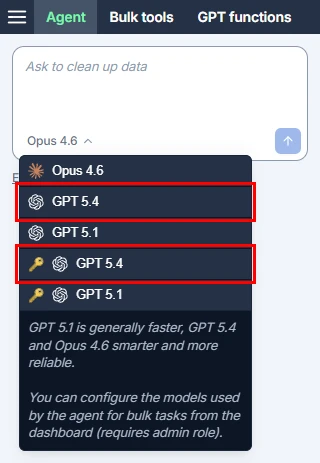
GPT-5.4 as Agent model
GPT-5.4, the latest in OpenAI's reasoning-focused family, is now also available as an Agent model in GPT for Sheets and Excel, with or without an API key.
Auto-compaction for long chats
Long-running Agent chats now automatically compact context when approaching token limits, allowing the chat to continue in the same thread instead of failing with a context window error. This means you can have longer, more complex conversations with the Agent without interruption.
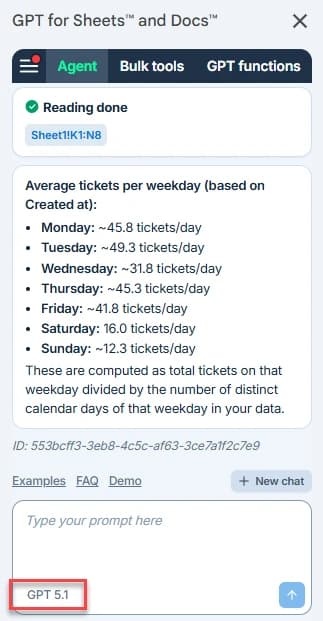
Model name in Agent chat field
The Agent chat field now displays the model name, so you can always see which model is powering the Agent.
🎛️ Dashboard and administration
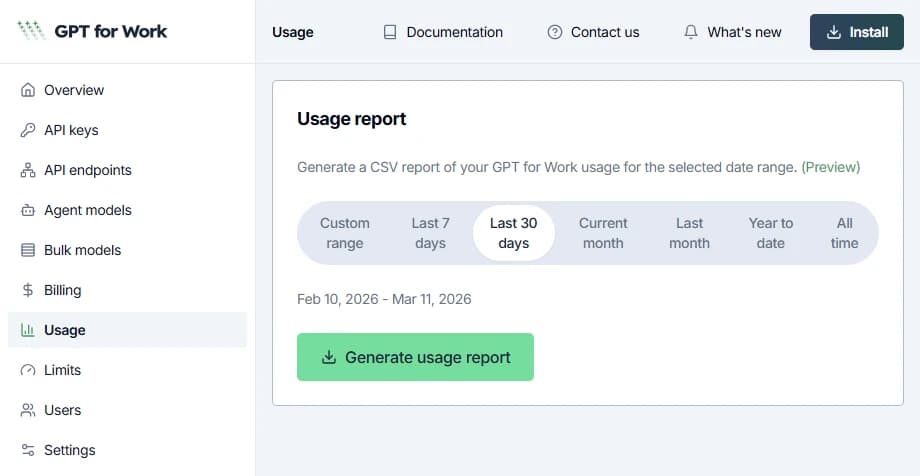
Usage reports
If you're a space owner or admin, you can now generate and download usage reports for your space from the GPT for Work dashboard. You can select a predefined time range or define a custom time range for a report.
Spending limit management improvement
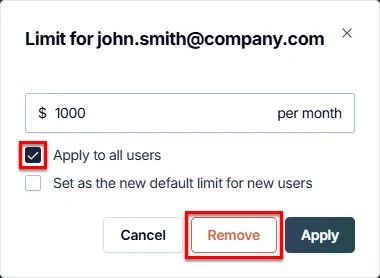
Space owners and admins can now remove all per-user monthly spending limits at once from the GPT for Work dashboard. Individual and space-wide limits can also be set and adjusted from the same page.
Billing page updates
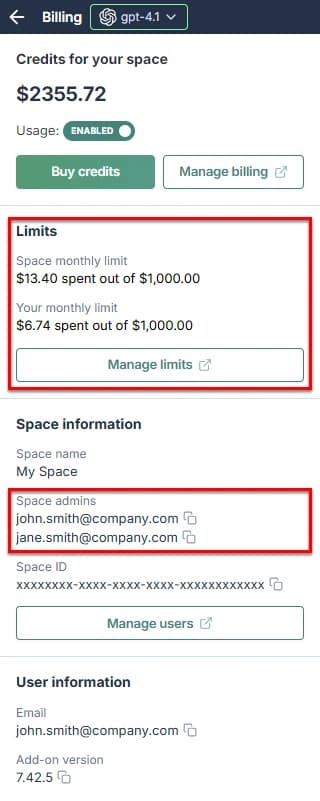
The add-on Billing page now displays the monthly spending limits set for your space and also lists the admins of your space.
⚡ UX and performance improvements
- GPT for Excel now detects protected workbooks and skips execution, preventing unnecessary costs.
GPT_MATCHis now more stable and responsive when running many executions on large ranges simultaneously. - The deprecated Token Counter and Formula Assistant features have been removed from the GPT for Sheets sidebar.
- You can now use your full remaining balance, even when approaching your spending limit or running low on credits.
🧠 New AI bulk models
OpenAI GPT-5.4, GPT-5.4 mini, and GPT-5.4 nano 

OpenAI GPT-5.4 is now available, with or without an API key. Building on GPT-5.2's general reasoning capabilities, GPT-5.4 delivers even more consistent and polished results on real-world tasks.
We also added two smaller models from the GPT-5.4 family:
- GPT-5.4 mini significantly improves over GPT-5 mini across reasoning, multimodal understanding, and tool use, while running more than twice as fast.
- GPT-5.4 nano is the smallest and cheapest version of GPT-5.4. The model is great for tasks where speed and cost matter most, such as classification, data extraction, and ranking.
Anthropic Claude Opus 4.6 and Claude Sonnet 4.6
Anthropic Claude Opus 4.6 and Claude Sonnet 4.6 are now available, with or without an API key. Claude Opus 4.6 was already available as an Agent model — it is now also available for bulk tasks.
Google Gemini 3.1
Google Gemini 3.1 Pro Preview is now available with an API key, replacing Gemini 3 Pro Preview.
Google Gemini 3.1 Flash Lite Preview is also available with an API key as a bulk model. Gemini 2.0 Flash and Gemini 2.0 Flash Lite are no longer supported.
📝 New guides for Google Sheets and Excel
We published several new guides and comparisons this month:
-
How to Use AI in Google Sheets
— A complete guide to using AI in Google Sheets, from bulk formulas to the Agent. -
How to Use AI in Microsoft Excel
— A complete guide to using AI in Excel, covering GPT functions, the Agent, and more.
We also published more specialized articles, such as AI Agents for Excel: A Benchmark Comparison and Google Sheets Pivot Tables: A Beginner's Guide (+ AI Alternatives).
📖 To go further
Check out our resources to get the most out of GPT for Work:
- 📚 Step-by-step guides for Sheets, Excel, Word, and Docs
- 📖 Complete documentation — Find everything you need to know about GPT for Work!
- 📝 Our blog articles for e-commerce, SEO, and market research
- 📺 Our YouTube channel with video tutorials
- 📄 Release notes — Or read them directly in the add-ons!
- 🔧 Contact support — Need help? Reach out to our friendly team.