July 2026 was a big month for the Agent. You can now run several Agent conversations at the same time and follow the ones working in the background while you get on with something else. In GPT for Excel, you can now connect Agent models through your own API endpoints, including Azure OpenAI. Add to that a set of Agent chat refinements, a refresh button in the model switchers, powerful new models, and numerous minor improvements and fixes.
Explore the key improvements and announcements below, and check out the release notes for the full details.
🧵 Run several Agent conversations in parallel 

The Agent is no longer one conversation at a time. Select New to start a conversation while another one is still running — for example, one per sheet — and each conversation keeps working on its own task.
The conversation history lists all of your conversations and their status, so you can see at a glance which ones are still running in the background, and switch back to an earlier one whenever you want to check on it.
🔌 Connect Agent models through API endpoints
If your space is on the pay-as-you-go, Business, or Enterprise plan, you can now run the Agent in GPT for Excel on models served from your own API endpoints. The endpoints must be compatible with OpenAI's Responses API and be publicly accessible over the internet through HTTPS. Set them up in the GPT for Work dashboard, then pick the model in the Agent model switcher. See Connect to OpenAI-compatible API endpoints from Excel for the details.
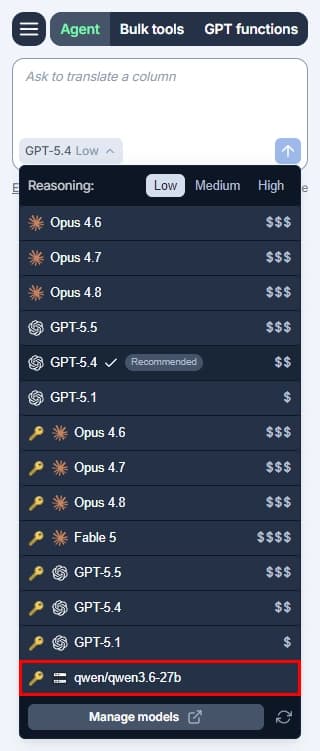
Later in the month, the same setup opened up to Azure OpenAI endpoints (Responses API): Configure your Azure OpenAI endpoint and model in the dashboard, and the model shows up in the Agent model switcher in GPT for Excel.
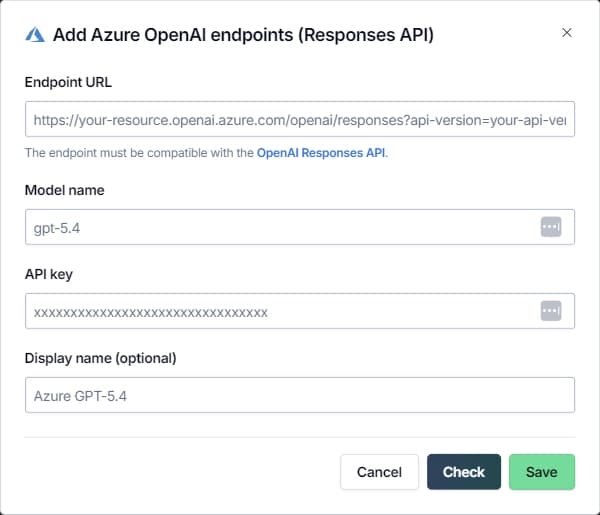
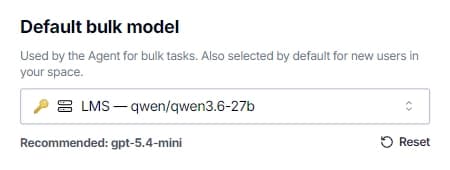
Two smaller additions round this out. First, the dashboard now automatically checks that a custom API endpoint works when you save it, so you find out right away if something's off — the manual Check button is still there. Second, you can now select a model from a custom API endpoint as your space's default bulk model.
💬 Agent chat refinements
Point the Agent at a specific sheet
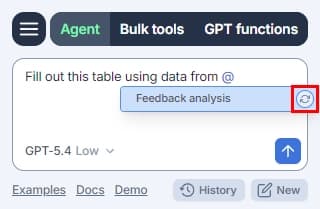
Type @ in the Agent chat field to reference a specific sheet in your prompt. Typing after the @ filters the list, and you can pick a sheet with the arrow keys and Enter, or with the mouse. The list also has a refresh button, so you can reload it without reopening the chat — and in GPT for Excel, it reloads automatically each time you open it.
Adjust the reasoning effort mid-conversation
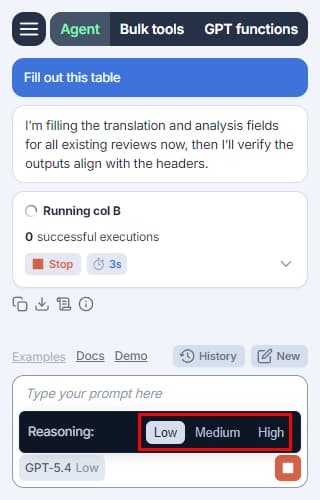
Reasoning effort arrived in June; now you can change it in the middle of a conversation, without starting over. Dial it up when the task gets harder, dial it back down for the routine parts. The model itself stays the same across the conversation.
Steadier replies
Agent replies now appear at a smooth, steady pace instead of in sudden bursts. It's most noticeable with Anthropic Claude models that have thinking enabled.
🔄 Refresh the model list 
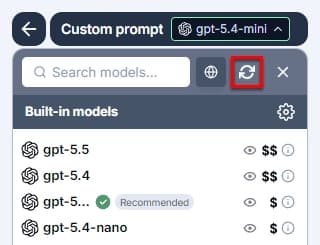
The model switchers for bulk tools and GPT functions in GPT for Sheets and Excel, as well as the model switcher in GPT for Word, now have a refresh button. Add an API key or a new model, hit refresh, and it's there — no need to close and reopen the sidebar.
🤖 New models
Anthropic Claude Opus 5
Anthropic Claude Opus 5 is now available as an Agent model in GPT for Sheets and Excel, with or without an API key. Opus 5 is Anthropic's new state-of-the-art model for daily knowledge work.
OpenAI GPT-5.6 Sol and Luna
OpenAI GPT-5.6 arrives in the Agent in GPT for Sheets and Excel, with or without an API key, in two flavors: GPT-5.6 Sol is OpenAI's frontier model for complex professional work that requires advanced reasoning and tool use, while GPT-5.6 Luna is the fastest and most affordable model in the GPT-5.6 family, optimized for cost-sensitive workloads.
Anthropic Claude Fable 5
Anthropic Claude Fable 5, Anthropic's most intelligent model to date, is now available as a connected Agent model in GPT for Sheets and Excel — bring your own Anthropic API key to use it.
Anthropic Claude Sonnet 5 
Anthropic Claude Sonnet 5 is now available as a bulk model in GPT for Sheets, Excel, Word, and Docs, with or without an API key. It's built to be the most agentic Sonnet model yet.
⚡ Other improvements and fixes
- Error messages are now shorter, clearer, and more consistent across all GPT for Work add-ons, making it easier to understand what went wrong and what to do next.
- GPT for Excel now limits how many operations it sends to Excel at the same time. When too many operations overlapped, Excel rejected some of them, which could freeze the add-in or leave the Agent looking stuck. The lower limit doesn't cost you any speed: Bulk tool and Agent runs are as fast as before.
- The following models are no longer supported because OpenAI retired them. GPT for Work automatically switches to the replacement models, so you don't need to update anything: GPT-4o Search Preview and GPT-4o mini Search Preview → GPT-5 Search API, and GPT-5 Chat → GPT-5.5.
- Removed the option to pause credit usage for a space in the GPT for Work dashboard. To limit how much your space can spend, set extra-usage limits (subscriptions) or monthly spending limits (pay-as-you-go).
- Fixed an issue where the Agent stopped working after signing out and back in without reloading the sidebar, including when your session expired.
- Fixed several issues in the Agent sign-in flow that could cause sign-in to fail silently, delay your prompt, or let you send messages before you were signed in.
- Fixed an issue where the Agent chat field could clear or stop responding when you typed with an Input Method Editor (IME), such as Japanese or Chinese, preventing you from sending your first message.
- Fixed an issue where refreshing the list of models cleared the selected model, even though it was still available — for connected models in GPT for Sheets, and for OpenAI Assistant models in GPT for Excel.
- Fixed an issue where the add-ons kept returning free-trial-ended errors instead of stopping immediately once free-trial credits ran out.
- Fixed an issue where usage statistics were missing for an Agent run that resumed after a billing error, such as running out of credits.
- Fixed an issue that prevented you from saving your Perplexity API key.
📖 To go further
Check out our resources to get the most out of GPT for Work:
- 📚 Step-by-step guides for Sheets, Excel, Word, and Docs
- 📖 Complete documentation — Find everything you need to know about GPT for Work!
- 📝 Our blog articles for e-commerce, SEO, and market research
- 📺 Our YouTube channel with video tutorials
- 📄 Release notes — Or read them directly in the add-ons!
- 🔧 Contact support — Need help? Reach out to our friendly team.