How your balance is consumed
With GPT for Work, you're in complete control of your spending:
-
You only pay when you use the add-ons: No subscription fees or recurring charges.
-
You can buy a pack when you need more balance: The balance from the pack is valid for one year, giving you plenty of time to use it.
-
You cannot overspend: Once your balance runs out, GPT for Work stops processing requests. You can disable usage at any time from the GPT for Work dashboard.
When you use GPT for Work, you consume balance based on the number of tokens and special capabilities used. This applies to all features: the Agent, bulk AI tools, and GPT functions. Furthermore, the amount of balance consumed per token depends on the AI model used.
Model prices
AI models have different prices per token. This means that the exact same request (same number of tokens) will incur a different cost depending on which model is used. Using a custom API key is cheaper than using a model without an API key.
Some models have special capabilities which incur additional costs. For example, web search models carry an additional per-search cost on top of the token cost.
-
Compare different models for your specific use case with our cost estimator.
-
Check the prices for all models in AI providers and models.
Example: Using the Agent
Creating a formula and filling it down
You want to compute employee seniority based on the date of hire and the current date. You have a spreadsheet with each employee's start date in column A.
You type the following prompt in the chat:
Calculate employee seniority.
The Agent reads your request, generates a formula, writes it in column B, fills it down, and then confirms that the request has been handled.
Here's how the above interaction consumes tokens:
 You send your request to the Agent.
 The Agent analyzes your request along with a spreadsheet sample and internal instructions.
 The Agent reasons about your request and decides to write a formula.
 The Agent calls an internal tool to write the formula in column B and fill it down. This tool doesn't use AI, so no tokens are consumed.
 The Agent generates a message to confirm that the request has been handled.
Total number of tokens consumed: ~23,500
Total cost for this use case: ~$0.05
Translating a list of titles
You want to translate a list of 20 product titles into four languages. You have a spreadsheet with the product titles in column A and one column for each target language.
You type the following prompt in the chat:
Translate these product titles into each language.
Keep brand names intact.
Capitalize the first letter of the product type.
The Agent reads your request, uses the Custom prompt bulk AI tool to generate the four translations for each row, and then confirms that the request has been handled.
Here's how the above interaction consumes tokens:
You send your request to the Agent.
The Agent analyzes your request along with a spreadsheet sample and internal instructions.
The Agent reasons about your request and configures a bulk AI tool run for the translations and sends the configuration to the tool.
The bulk AI tool receives the request from the Agent, along with the text to be translated, and generates the translations.
The Agent generates a message to confirm that the request has been handled.
Total number of tokens consumed: ~43,000 (Agent: 17,500 tokens | Bulk AI tool: 25,500 tokens)
The total cost for this use case depends on the model used by the Agent for bulk tasks. With gpt-4.1 without an API key, the total price is around $0.83 (Agent: $0.07 | Bulk AI tool: $0.76).
Example: Using a bulk AI tool
Click to expand...
You want to extract the number of gears from 20 bike descriptions. You have a spreadsheet with the descriptions in column A. You open the Extract bulk AI tool and configure it as follows:
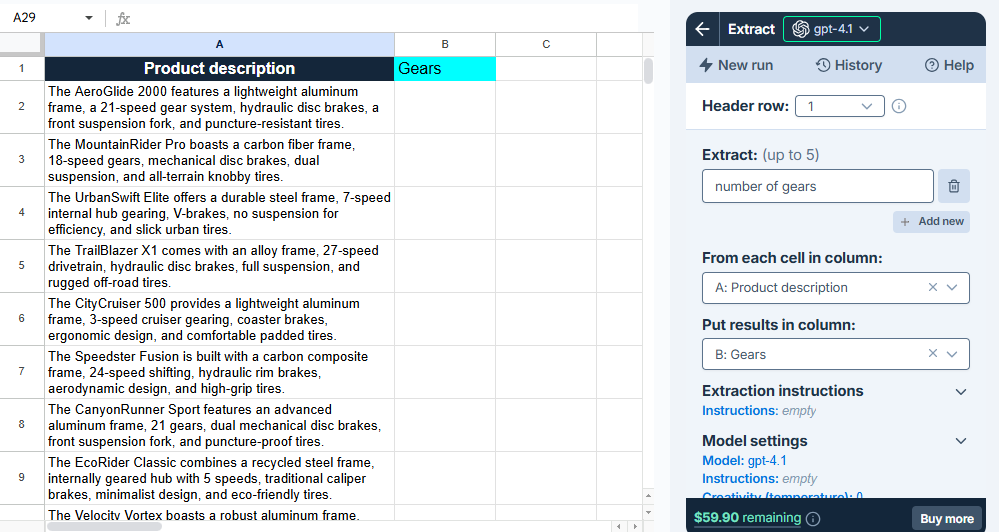
When you run the tool, the AI extracts the number of gears from the descriptions and writes them to column B.
Here's how the above interaction consumes tokens:
The bulk AI tool receives your request, including the configuration, the value of the first row for column A, and internal instructions (53 tokens).
For the first row, the bulk AI tool extracts the number of gears from the description and writes it in the corresponding cell in column B (1 token).
The previous steps are repeated for each remaining row in the spreadsheet (around 19 x 54 = 1,026 tokens).
Total number of tokens consumed: ~1,080
The total cost for this use case depends on the model used. With gpt-4.1 without an API key, the total price is around $0.03.
In this example, the global instructions are empty.
Example: Using a GPT function
Click to expand...
You want to clean up a list of 100 company names. You have a spreadsheet with the company names in column A.
You type the following GPT formula in cell B2:
=GPT("Remove the legal entity suffix from the company name", A2)
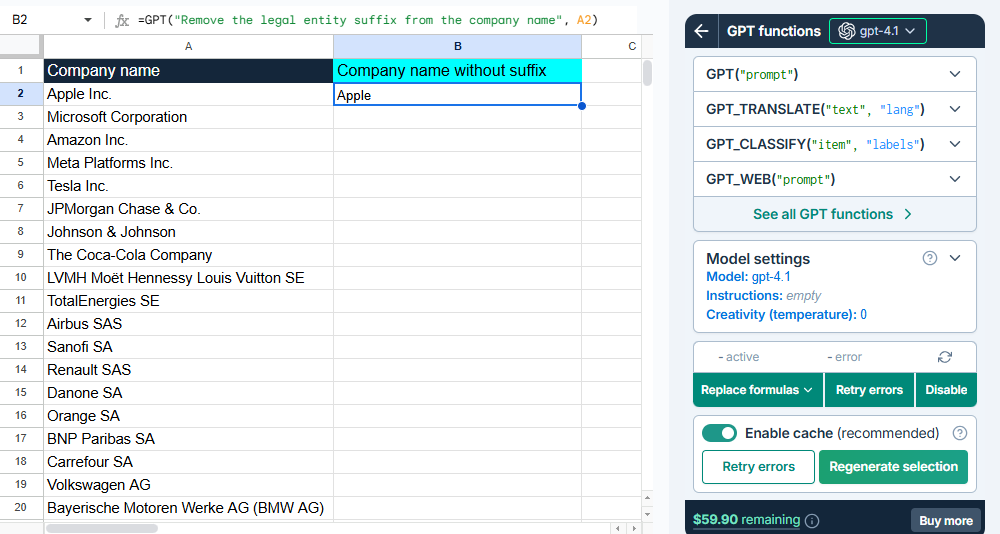
The formula sends your request to the AI, the AI generates a response, and the response is written to cell B2. You then fill down the formula to process the rest of the spreadsheet.
Here's how the above interaction consumes tokens:
The formula in cell B2 sends your request to the AI, with internal instructions (17 tokens).
The AI generates a response and writes it in cell B2 (1 token).
You fill down the formula to process the remaining company names (around 99 x 18 = 1,782 tokens).
Total number of tokens consumed: ~1,800
The total cost for this use case depends on the model used. With gpt-4.1 without an API key, the total price is around $0.05.
In this example, the global instructions are empty.
Special capabilities that affect cost
Web search
Web search models can incur an additional cost per search, depending on the model used:
-
Without an API key: Token cost + search cost
-
With an API key: Token cost only (search cost is paid directly to the AI provider)
The search cost varies depending on the AI provider and the model's context size. For all search costs, see AI providers and models.
Instructions
Global instructions are extra context that you define per spreadsheet. Think of them as background information the AI should always know. The global instructions are added to the request for each row processed with bulk AI tools and with every GPT formula executed in the spreadsheet. For example, if you add global instructions that take up 100 tokens, and you run a bulk AI tool across 1,000 rows, that's 100,000 extra tokens.
Specific instructions or reference materials such as glossaries or lists of categories also add tokens to every AI request.
We cache request inputs at the provider level whenever possible to reduce costs. Cached tokens receive a 75% discount compared to regular token pricing.
Reasoning models
Reasoning models are trained to think before they answer, producing an internal chain of thought before responding to a prompt. They generate two types of tokens:
-
Reasoning tokens make up the model's internal chain of thought. These tokens are typically not visible in the output from most providers.
-
Completion tokens make up the model's final visible response.
You are billed for both types of tokens.
To check whether a model is a reasoning model, hover over the model info icon in the model switcher. A tooltip opens with detailed information about the model. Check the Reasoning line.
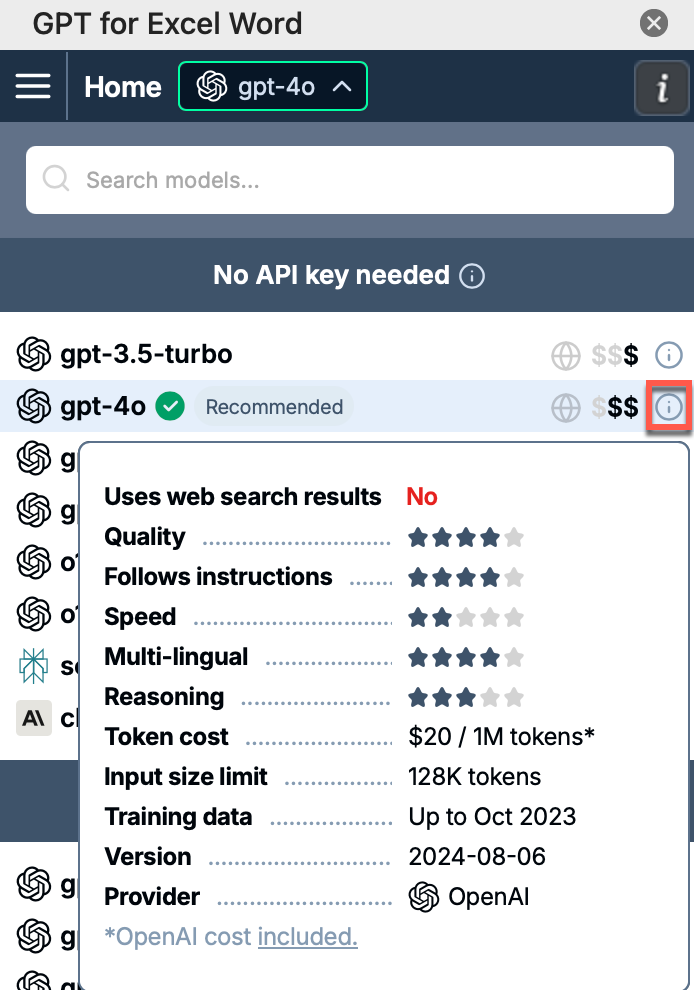
Image inputs (vision)
Vision models can process images as input. The following features support vision models:
-
Custom prompt bulk AI tool in GPT for Sheets and GPT for Excel
-
Prompt images (Vision) bulk AI tool in GPT for Sheets and GPT for Excel
-
GPT_VISION function in GPT for Sheets and GPT for Excel
Image inputs are measured and charged in tokens, just like text inputs. How images are converted to text tokens depends on the model. You can find more information about the conversion in the AI providers' documentations:
What's next?
-
Use the cost estimator to estimate what your specific use case will cost.
-
Buy a pack to top up your balance.