Yet another year has passed, and GPT for Work has continued to grow and improve. 2025 was our biggest year yet: We launched the Agent, added support for dozens of new AI models, and made team management easier. Read on to see just how powerful and easy to use GPT for Work has become, and see what we have in store for 2026.
For the complete changelog, check out our release notes.
👨🏻💼 The Agent: A game-changer for spreadsheets
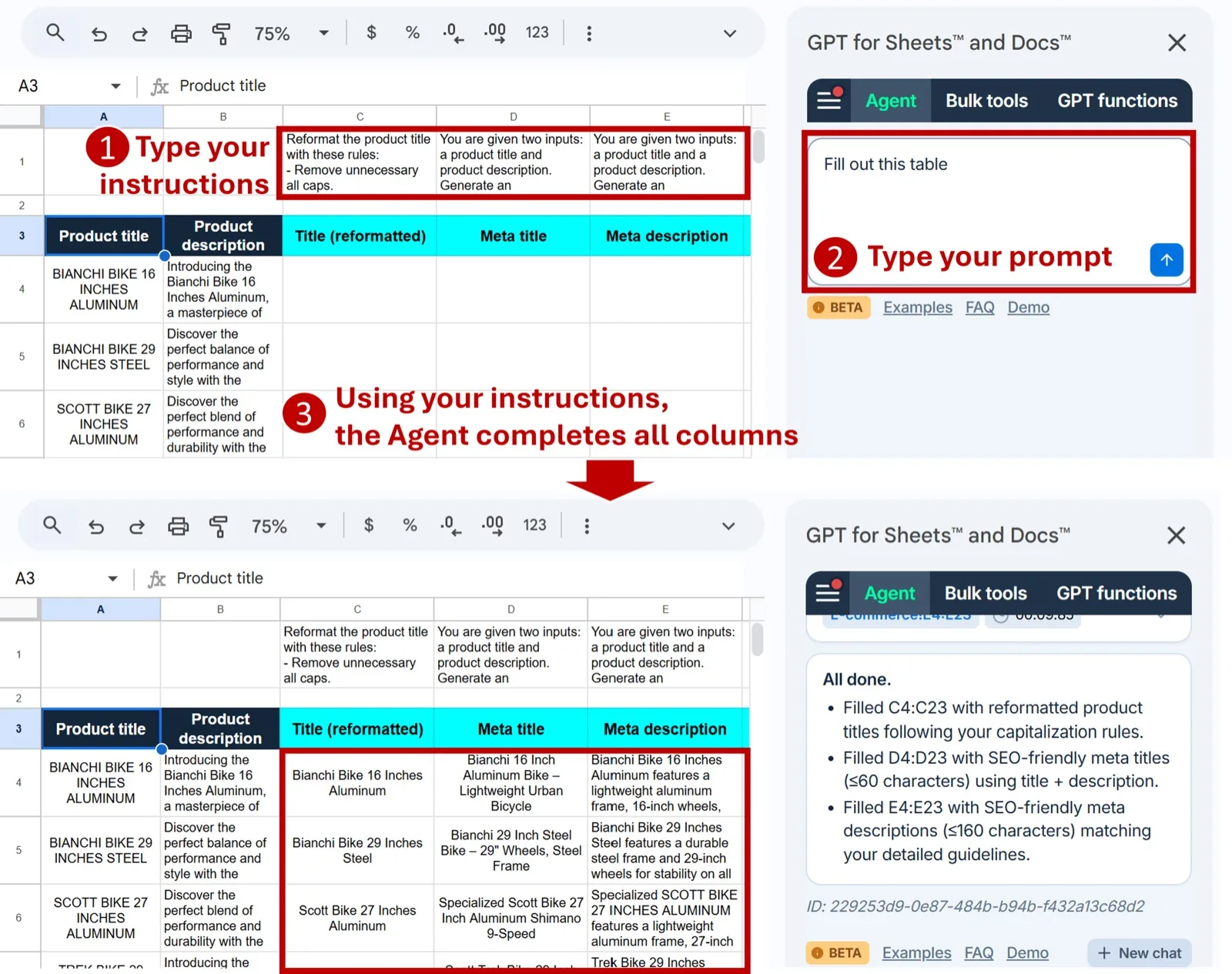
The biggest event of 2025 was the launch of the Agent, a conversational interface that understands your spreadsheets and executes bulk operations with a single prompt. No configuration, no formulas to write. Just describe what you need in plain language.
👉 The Agent can do bulk content generation, translation, web search, data cleaning, and analysis — all with just a few words.
👉 The Agent can autonomously configure and run multiple bulk tasks one by one.
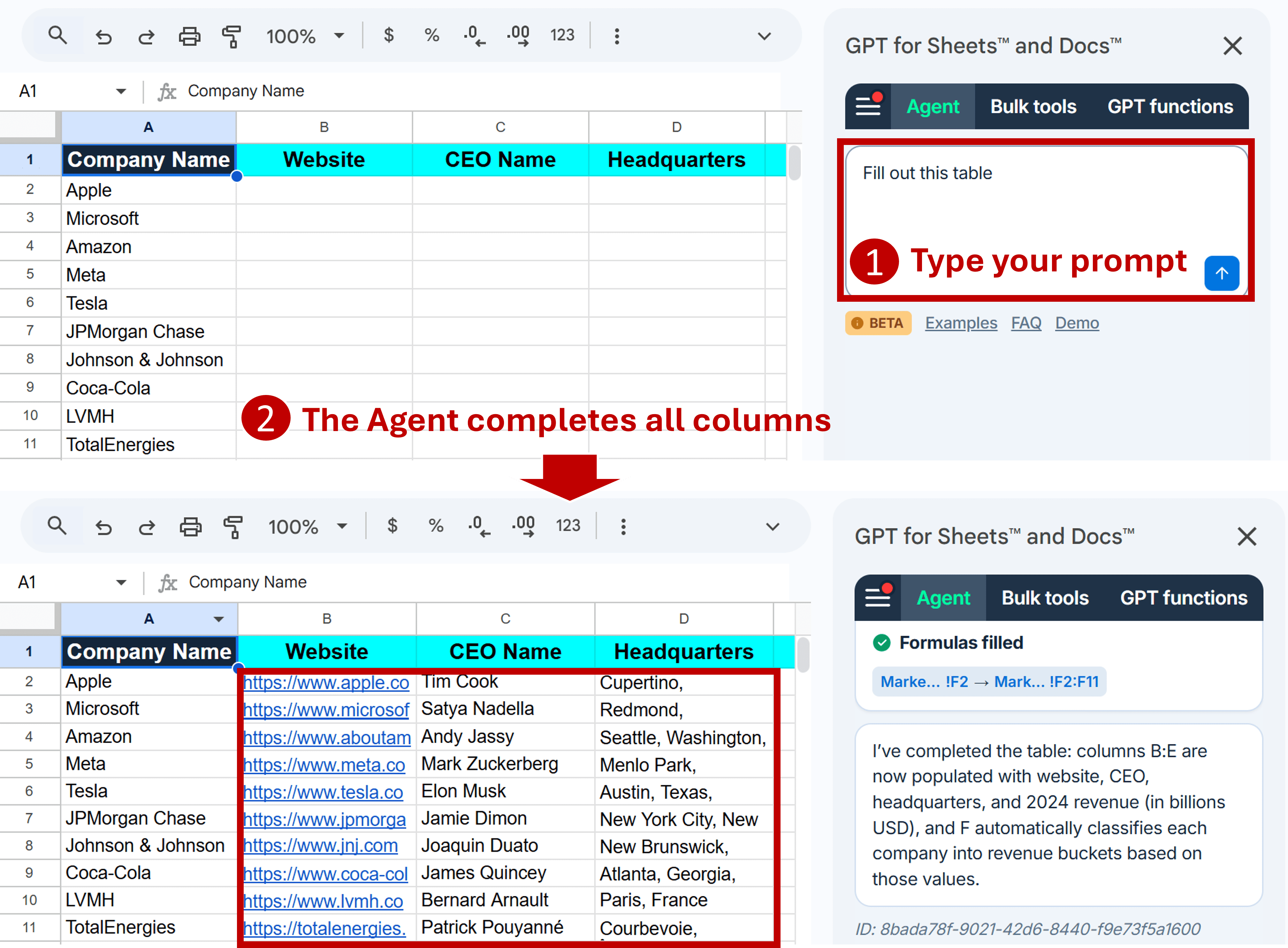
👉 Provide per-column instructions that the Agent will follow to do its job.
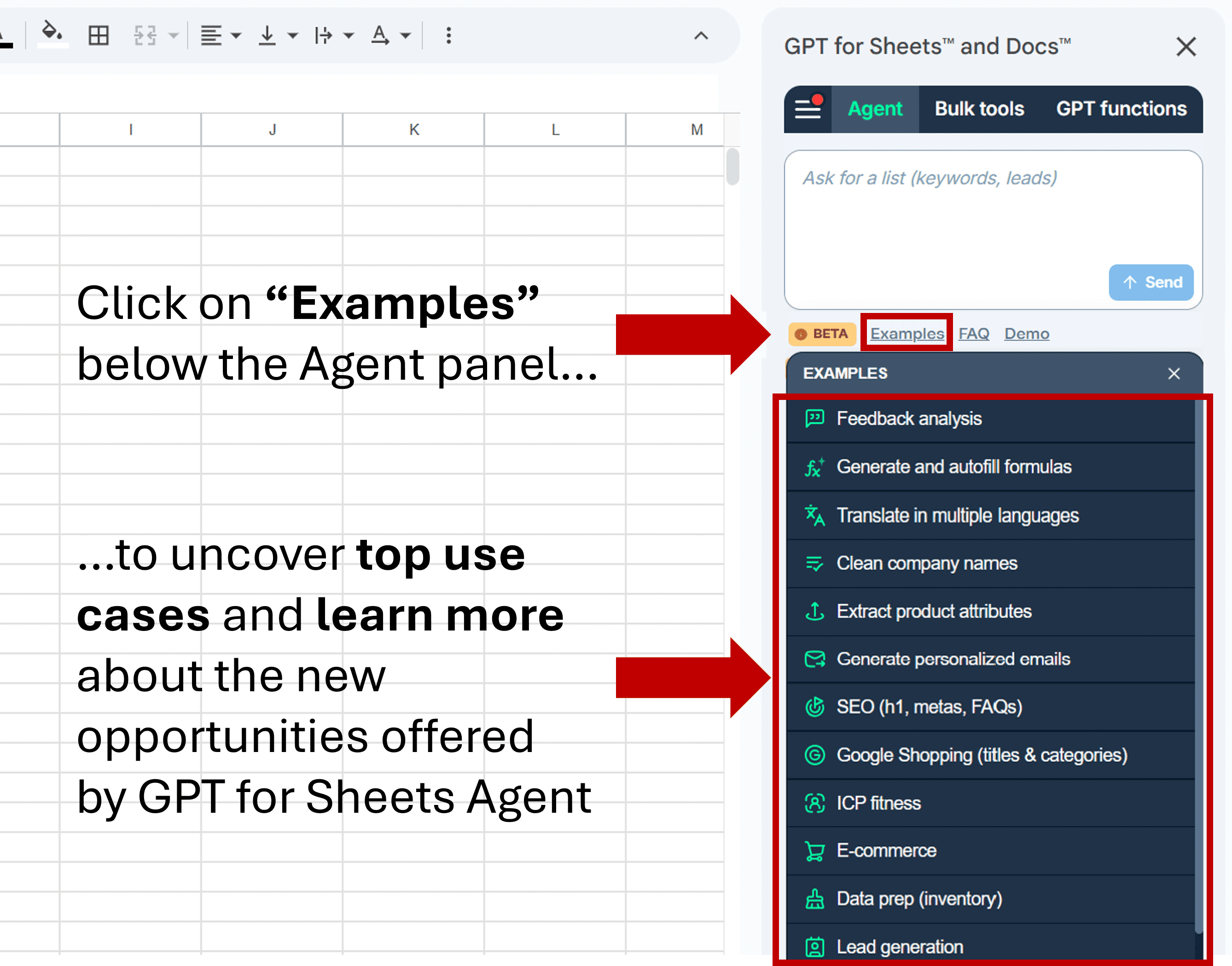
👉 Explore pre-built use cases for formula assistance, feedback analysis, translation, or market research by clicking Examples below the Agent chat box.
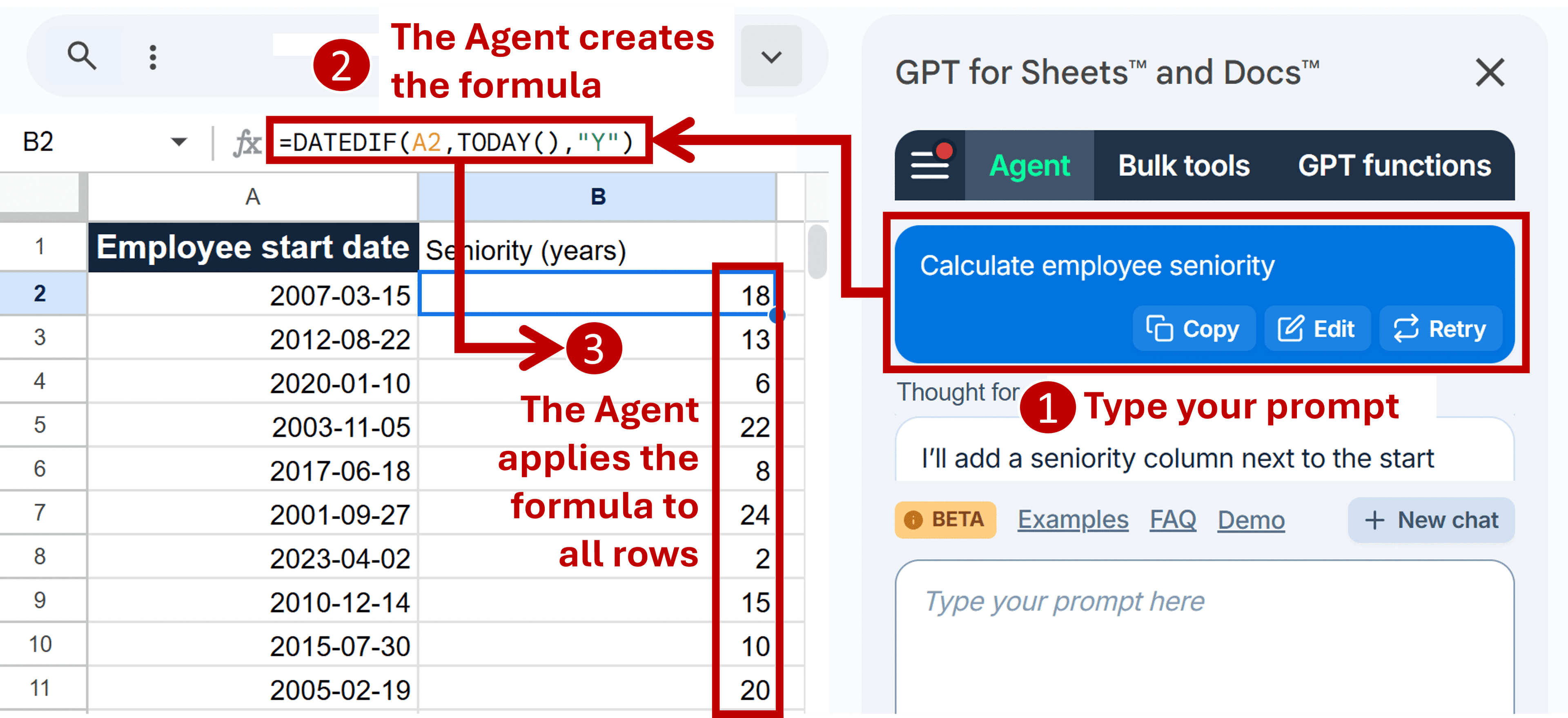
🔢 The Agent can work on numbers
👉 The Agent can both generate formulas and help fix broken formulas.
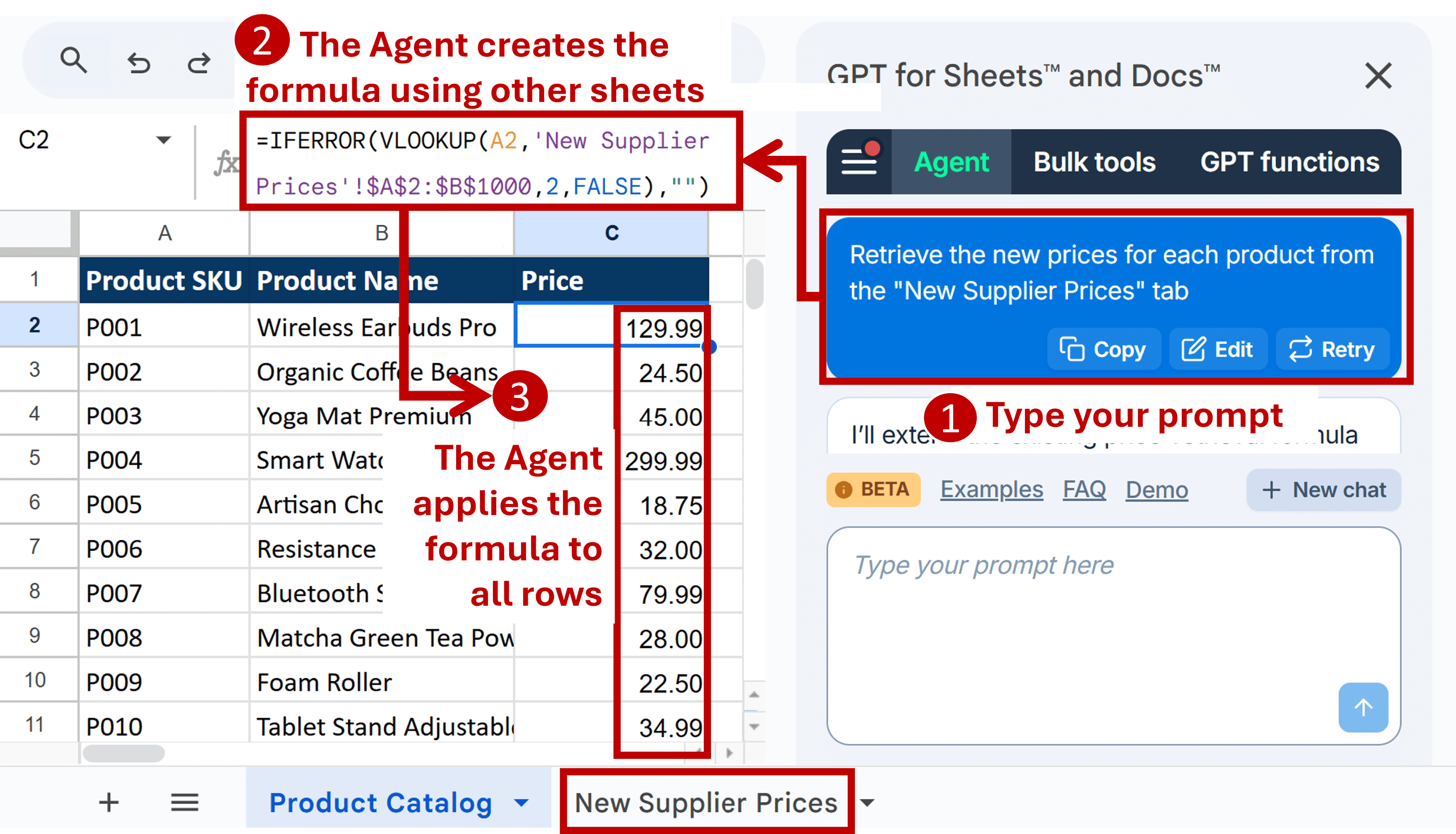
👉 The Agent can even generate more complex formulas like VLOOKUPs across tabs!
🏢 Team management in the dashboard
The GPT for Work dashboard received major upgrades:
👉 Invite and manage users to your space.
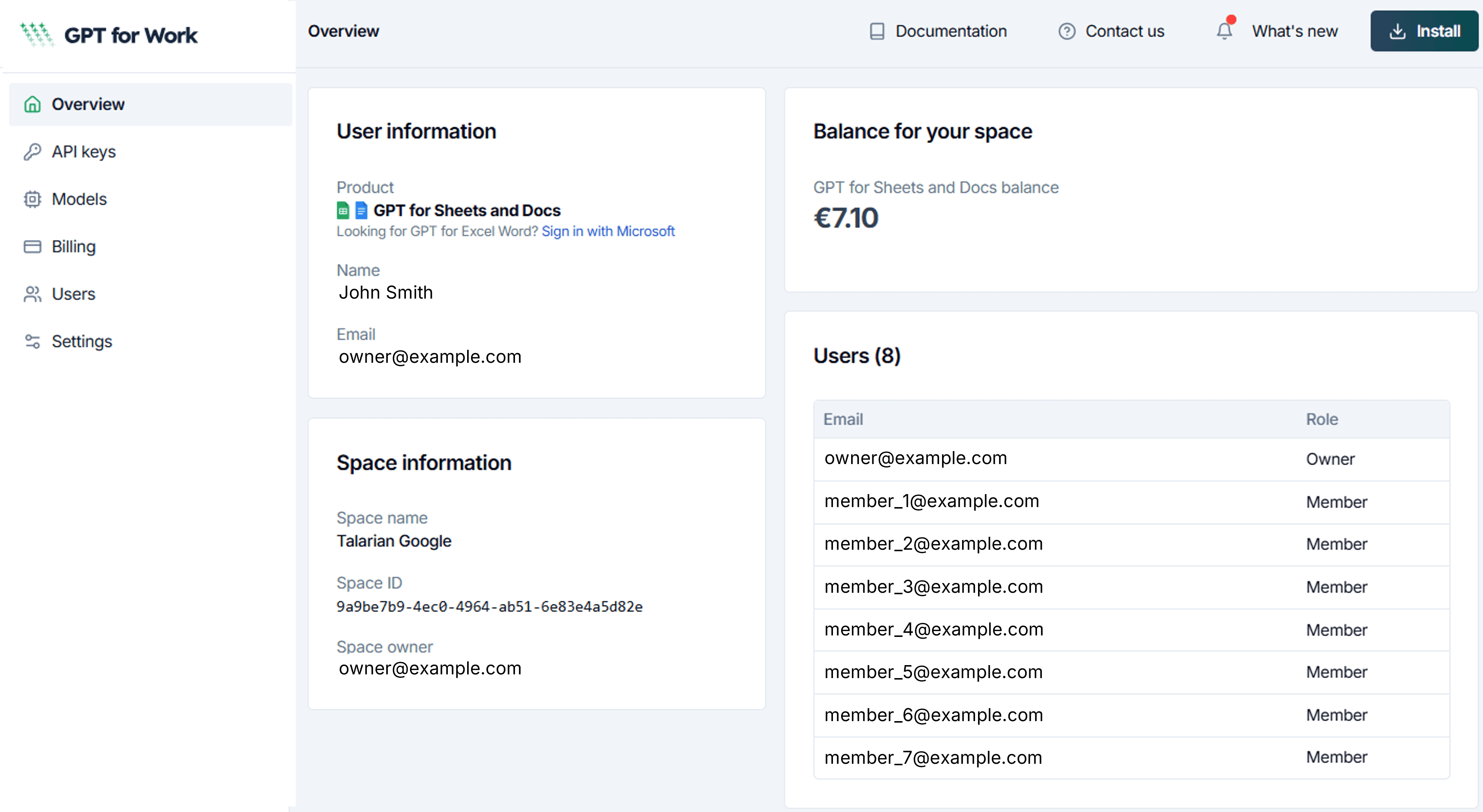
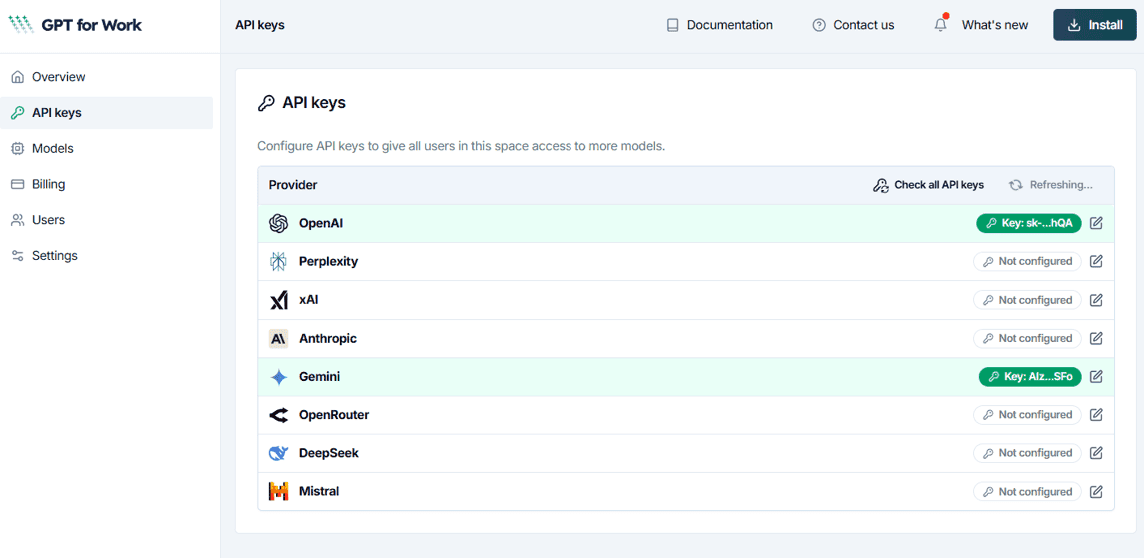
👉 Space-level API keys: Configure once for your entire team.
👉 Admin role: Delegate management tasks and pack purchases.
👉 Ownership transfer: Transfer space ownership directly from the dashboard.
👉 Control personal API keys: Choose whether team members can use their own API keys and custom endpoints.
👉 Centralized model management: Set default models, control which models appear, and define how new models are introduced.
👉 Azure OpenAI at team level: Configure Azure endpoints once for an entire space.
👉 Improved pack purchase flow: Buy packs directly in the dashboard.
🤖 A year of AI model expansions
2025 saw an explosion of new AI models available in GPT for Work. Here are the highlights (see the full timeline in our release notes):
OpenAI models
- o1, o1-mini, o3-mini: Advanced reasoning models for complex problem-solving
- o3 and o4-mini: Powerful reasoning with high-performance options
- GPT-4.5 Preview: Creative and open-ended thinking
- GPT-4.1, GPT-4.1 Mini, GPT-4.1 Nano: Improved speed, accuracy, and cost-effectiveness
- GPT-5, GPT-5 Mini, GPT-5 Nano, GPT-5 Chat: Vision and reasoning combined in flagship models
- GPT-5.1: OpenAI's newest flagship balancing intelligence and speed
- GPT-5.2: OpenAI's most capable model
- GPT-5 Search API: Fast, reliable web search directly in spreadsheets
Anthropic Claude models
- Claude 3.7 Sonnet: Hybrid reasoning for quick and extended thinking
- Claude Sonnet 4 and Opus 4: Superior reasoning with precise instruction-following
- Claude Sonnet 4.5 and Opus 4.1: Latest iterations with enhanced capabilities
- Claude Haiku 4.5: Fastest and most cost-efficient Claude model
- Claude Opus 4.5: Powerful vision model
Google Gemini models
- Gemini 2.0 Flash: Fast results with advanced multimodal capabilities
- Gemini 2.5 Flash: Cost-effective reasoning with configurable effort levels
- Gemini 2.5 Flash-Lite: Low-cost, low-latency for high-volume tasks
- Gemini 2.5 Pro: Premium performance and stability
- Gemini 3 Flash: Reasoning model with web search and URL scraping
Perplexity Sonar models
- Sonar, Sonar Pro, Sonar Reasoning, Sonar Reasoning Pro: Web search with real-time information and advanced reasoning
xAI Grok models
- Grok 2 → Grok 3 → Grok 4 Fast → Grok-4.1 Fast: Evolution of xAI's reasoning models
Mistral models
- Mistral Large, Mistral Small, Ministral 8B, Ministral 3B: Cost-efficient open-source alternatives
For a complete list of all supported models, see AI providers & models.
🔗 New integrations and API support
2025 brought powerful new ways to connect to AI models:
- DeepSeek support: Use DeepSeek Chat and DeepSeek Reasoner with your own API key.
- xAI Grok support: Leverage Grok's reasoning capabilities in all add-ons.
- Azure AI integration: Connect to Azure-hosted models directly in GPT for Excel and Word, now available at both user and team levels.
- OpenAI-compatible local models: Use locally running inference servers like LMStudio, LocalAI, and KoboldAI with open-source models.
✍️ New bulk tools
We introduced two new bulk tools:
- Generate: Create text based on your spreadsheet data, with options to choose content types and use multiple columns for context.
- Rewrite: Rewrite content of an entire column at once with customizable instructions, content types, and additional context columns.
🖼️ Enhanced vision capabilities
2025 made image analysis in spreadsheets more powerful than ever:
- 14 vision models to choose from when using the Prompt Images (Vision) bulk tool or GPT_VISION function.
- Multiple images per row: Select up to five image columns in bulk tools.
- Vision-capable custom prompts: The Custom Prompt bulk tool can now process images alongside text.
- Image URL validation: Automatic URL checking before sending to AI providers, saving credits on invalid images.
🌐 Web search improvements
Web search got significantly better in 2025:
- OpenAI GPT-4o Search Preview: Fast web search queries without an API key.
- Perplexity Sonar enhancements: Domain filters expanded from 3 to 20, with search effort settings for cost/quality balance.
- Gemini URL context: Include URLs in prompts and Gemini will fetch and use the content automatically.
- Show sources: See the sources used by web search models for more transparency.
🎯 GPT for Word improvements
GPT for Word received major updates in 2025:
- Review modes: Choose between Chat (sidebar replies), Comment (margin comments), or Suggest (tracked edits directly in document).
- Improved chat history controls: Retry, copy, or delete previous prompts.
- Manual stop for insert & replace: Cancel long-running operations while keeping partial changes.
- Content preview and context size warnings: Better control over what's being sent to AI.
📄 GPT for Docs launches
In May, GPT for Docs moved out of beta with the same billing and pricing as GPT for Sheets. Your existing packs now work across both add-ons!
⚡ Performance improvements
We made GPT for Work faster than ever:
- GPT for Sheets loads 3x faster: Typically opens in ~2 seconds.
- 50% faster processing for large spreadsheets (10,000+ rows) in GPT for Excel.
- Smart rate limit optimization: Bulk tools automatically adjust execution speed to your model and API key limits.
🎨 User experience improvements
We introduced a new tabbed UI making it easy to switch between Agent, Bulk tools, and GPT functions. We also made GPT-4.1 the default model for new users, as it excels at instruction following and tool calling.
Other UX improvements included:
- Enhanced progress trackers showing model used and runtime counter while bulk tools run.
- Smart result column selection: Bulk tools automatically suggest the first empty column after your input data.
- Direct prompt import from cells in the Custom prompt bulk tool.
- Dynamic target languages in the Translate bulk tool: set different languages for each row.
- Location option for web search: Tailor OpenAI web search answers based on geography.
- Case-insensitive column matching: In the Custom prompt bulk tool,
{{description}}now works even if your column header is "Description".
💰 Pricing changes
Throughout 2025, we adjusted pricing to balance accessibility and sustainability:
- In June, we made AI more accessible with huge price drops for models without an API key, while previously free BYOK models moved to $1 per million tokens. Custom endpoint models (Azure, Ollama, local servers) remain free for personal use.
- In August, prices were updated for popular models like GPT-4o, GPT-4.1, and GPT-5 when used without an API key.
- In December, GPT-4.1 without an API key moved to $30 per 1M tokens.
See the full pricing history in Model prices.
🔮 What's in store for 2026?
In 2026, the product will continue to improve tremendously. You can expect to see:
- The Agent format cells, insert rows, columns, and tabs, and create charts and pivot tables.
- An API to the Agent, making it possible to integrate the Agent into workflow automation tools such as n8n, Zapier, or Make.
- A major performance boost on Google Sheets, with a new back end enabling bulk processing of up to 5,000 cells per minute instead of per hour.
- Smarter model selection by the Agent, with access to more models enabling advanced capabilities such as vision, web fetch, and web search.
- And a lot more!
If something (listed or not listed) matters to you, please tell us.
📚 Additional resources
- 📘 Documentation
- 📝 Release notes
- 🤖 AI providers & models
- 🔒 Security & Privacy FAQ
- 📺 YouTube channel
- 🎧 Contact our support team (no chatbot)