Pricing FAQ
Find answers to common questions about GPT for Work pricing. To negotiate a custom plan, contact sales.
You do not need an OpenAI ChatGPT subscription (Go, Plus, Pro, Business, or Enterprise plan) to use GPT for Work. If you have a ChatGPT subscription, you cannot use it with GPT for Work.
- Subscription
- Pay-as-you-go
How do I know which pricing model my space uses?
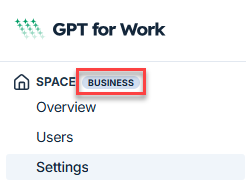
Open the GPT for Work dashboard. If the badge next to SPACE in the left sidebar shows Pay-as-you-go, your space uses legacy pay-as-you-go pricing. If it shows a plan name, your space uses subscription pricing.
Can I switch between subscription and pay-as-you-go pricing?
If your space uses legacy pay-as-you-go pricing, you can request a switch to subscription pricing by contacting support. Spaces with subscription pricing cannot switch to pay-as-you-go pricing.
How can I buy more credits?
You can buy credits at any time from the GPT for Work dashboard. Packs feed the shared extra-usage credits and can only be bought while your subscription is active.
How are credits consumed?
Each billing cycle, you use your seat's included usage first. Once you've used it up, you consume the space's shared extra-usage credits. For more information about credit consumption, see How credits are consumed.
Do credits expire?
Credit packs expire one year after your last purchase. Buy more credits at any time to reset the expiry to one year.
Example: You have $100 worth of credits. Your last purchase was 7 months ago, so these credits will expire in 5 months. You buy $29 worth of credits. You now have $129 worth of credits, which will expire in 12 months.
The included usage is separate: it resets at the start of each billing cycle and does not carry over.
Do I need credits if I set an API key or endpoint?
Yes, you need credits even if you use an API key or endpoint. Models available through an API key have their own pricing. Models available through a dedicated endpoint do not consume credits, but require credits to be available.
Can I share credits with my team?
Each seat has its own included usage, which resets at the start of each billing cycle, and the extra-usage credits are pooled across the whole space.
Can I share credits between Google and Microsoft accounts?
-
Credits bought for Google Sheets can be used on Google Docs, and vice versa.
-
Credits bought for Microsoft Excel can be used on Microsoft Word, and vice versa.
To transfer credits between Google and Microsoft accounts, contact support.
Can I transfer my credits to another account?
To transfer your credits to another account, contact support.
Can I set an auto top-up?
No, but you can buy larger packs to have your credits last longer.
Can I pause usage?
No, but you can set spending limits for extra usage to keep credit consumption under control. Learn more.
Can I set credit usage limits?
Yes. You can set a monthly spending limit for your space and individual monthly limits per user from the Limits page in the GPT for Work dashboard. Spending limits apply only to the shared extra-usage credits. Learn more.
How do I raise the monthly limit for my space or a user?
If you or your team hit a monthly limit, a space owner or admin can raise or remove it from the Limits screen in the GPT for Work dashboard. Monthly limits apply only to the shared extra-usage credits and are available on Business and Enterprise plans. Each seat's included usage cannot be increased. Learn more.
Why is my balance negative?
Before each run, the add-on estimates the cost and blocks the run if your balance is too low. If the final cost exceeds the estimate, your balance can go negative by a small amount. This amount is deducted from the following billing cycle.
Can I get a refund?
We do not offer refunds. We encourage you to carefully consider how many credits you need before buying extra-usage credits.
How do I know which pricing model my space uses?
Open the GPT for Work dashboard. If the badge next to SPACE in the left sidebar shows Pay-as-you-go, your space uses legacy pay-as-you-go pricing. If it shows a plan name, your space uses subscription pricing.
Can I switch between subscription and pay-as-you-go pricing?
If your space uses legacy pay-as-you-go pricing, you can request a switch to subscription pricing by contacting support. Spaces with subscription pricing cannot switch to pay-as-you-go pricing.
How can I buy more credits?
You can buy credits at any time from the GPT for Work dashboard.
How many credits do I need?
To estimate your credit usage, try our estimation tools.
How are credits consumed?
What's a token?
A token is a unit of text, such as a word, subword, punctuation mark, or symbol. Models split all input and output text into tokens for processing. Model providers use tokens as the basic unit for measuring model usage. Input tokens from your prompt and output tokens from the model's response contribute to your credit consumption. For more information, see Tokens and How credits are consumed.
Do credits expire?
Credit packs expire one year after your last purchase. Buy more credits at any time to reset the expiry to one year.
Example: You have $100 worth of credits. Your last purchase was 7 months ago, so these credits will expire in 5 months. You buy $29 worth of credits. You now have $129 worth of credits, which will expire in 12 months.
Do I need credits if I set an API key or endpoint?
Yes, you need credits even if you use an API key or endpoint. Models available through an API key have their own pricing. Models available through a dedicated endpoint do not consume credits, but require credits to be available.
Can I share credits with my team?
Yes. Team members share the same credits.
Can I share credits between Google and Microsoft accounts?
-
Credits bought for Google Sheets can be used on Google Docs, and vice versa.
-
Credits bought for Microsoft Excel can be used on Microsoft Word, and vice versa.
To transfer credits between Google and Microsoft accounts, contact support.
Can I transfer my credits to another account?
To transfer your credits to another account, contact support.
Can I set an auto top-up?
No, but you can buy larger packs to have your credits last longer.
Can I pause usage?
No, but you can set spending limits to keep credit consumption under control. Learn more.
Can I set credit usage limits?
Yes. You can set a monthly spending limit for your space and individual monthly limits per user from the Limits page in the GPT for Work dashboard. Learn more.
How do I raise the monthly limit for my space or a user?
If you or your team hit a monthly limit, a space owner or admin can raise or remove it from the Limits screen in the GPT for Work dashboard. Learn more.
Why is my balance negative?
Before each run, the add-on estimates the cost and blocks the run if your balance is too low. If the final cost exceeds the estimate, your balance can go negative by a small amount. This amount is deducted from your next credit pack purchase.
Can I get a refund?
We do not offer refunds. We encourage you to carefully consider how many credits you need before buying credits.
Do errors consume credits?
Yes. Input tokens are always billed. If a request times out, output tokens are billed as well. To avoid timeouts, use the Agent or the bulk tools.