Select the models for the Agent in Excel
In GPT for Excel, the Agent uses two types of models:
-
Agent models handle chat messages, create formulas, and execute complex tasks by breaking them down into smaller tasks and delegating these to bulk models.
-
Bulk models handle bulk tasks and web search tasks. The Agent uses bulk models when needed. The Agent can only use the bulk models you set in the GPT for Work dashboard.
Recommended models
For information about recommended models for the Agent, see Recommended models.
Select the Agent model
You can select the Agent model in the GPT for Excel sidebar. The models available depend on the models enabled for your space in the GPT for Work dashboard.
In addition to built-in models, you can select connected models in the model switcher. To make a connected model available, set an API key or set up an OpenAI-compatible API endpoint.
-
In the sidebar, select Agent.
-
Open the model switcher and select the Agent model.
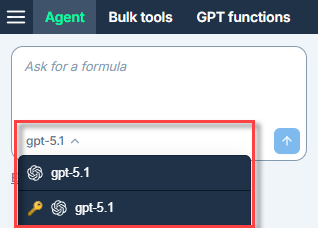
The Agent now uses the selected model.
Set the default bulk models
Prerequisites
You are the owner or an admin of the space.
You can set two default models for bulk tasks:
-
The Default bulk model is used by the Agent for bulk tasks. For new users in your space, this model is also selected by default for bulk tools and GPT functions.
-
The Default bulk model for web search is used by the Agent for bulk tasks that require web search. This model is also used by the GPT_WEB function.
You can only select enabled bulk models.
-
Sign in to the GPT for Work dashboard with your Microsoft or Google account.
-
In the sidebar, select Bulk models.
-
In the Default bulk model and Default bulk model for web search dropdowns, select the default bulk models for your space.
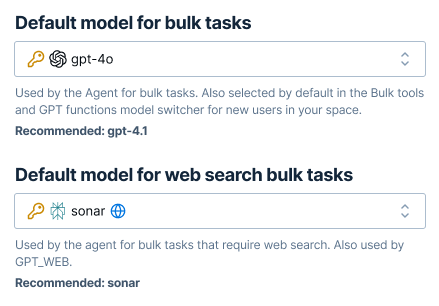
The Agent now uses the selected models for bulk tasks and web searches.
What's next
Learn more about models: