Pause usage
Pause usage from the GPT for Work dashboard to prevent users in your space from running the Google add-on (GPT for Sheets and Docs) or the Microsoft add-in (GPT for Excel and GPT for Word). To control costs without fully blocking usage, set monthly spending limits instead.
Prerequisites
Only the space owner or a space admin can pause or resume usage for a space.
 Google
 Microsoft
When you pause usage for the Google add-on:
-
Google Sheets still refreshes your spreadsheets automatically. Replace GPT formulas with their values to preserve the results.
-
If any space user has shared a spreadsheet with other users, these users can no longer execute GPT functions in that spreadsheet either.
To pause usage:
-
Sign in to the GPT for Work dashboard with your Google account.
-
In the Remaining credits section, use the toggle to disable space credit usage.
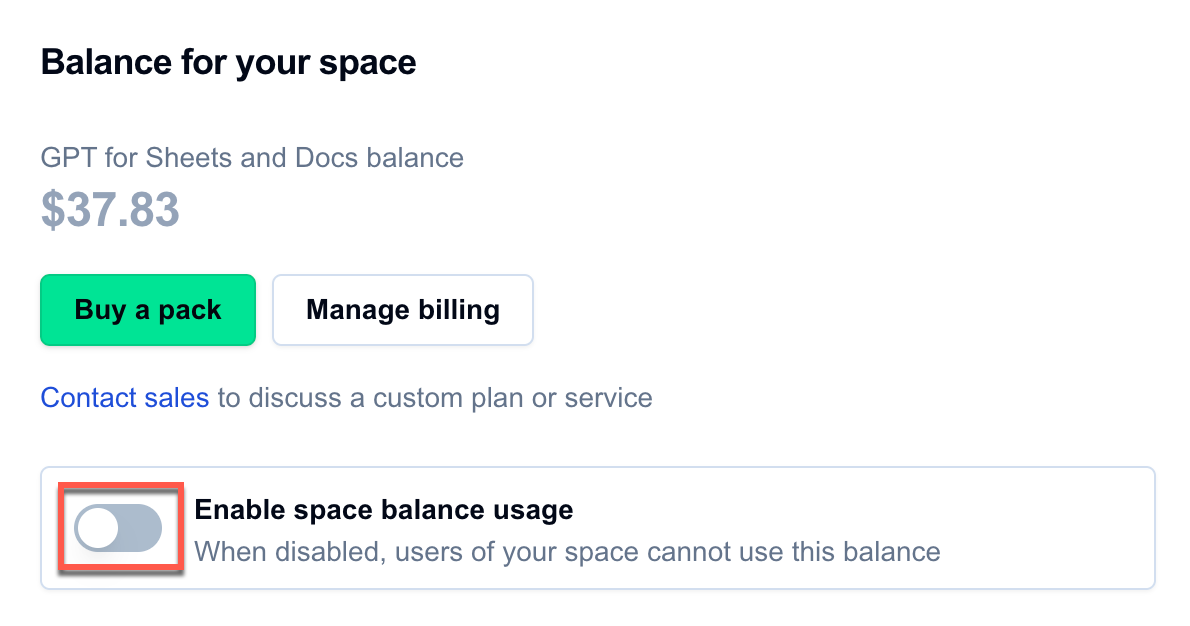
You've paused usage for the Google add-on. Space users can no longer use GPT for Sheets and Docs.
What's next
- When you are ready to use the add-ons again, go to the GPT for Work dashboard, and click Enable space usage.
To pause usage:
-
Sign in to the GPT for Work dashboard with your Microsoft account.
-
In the Remaining credits section, use the toggle to disable space credit usage.
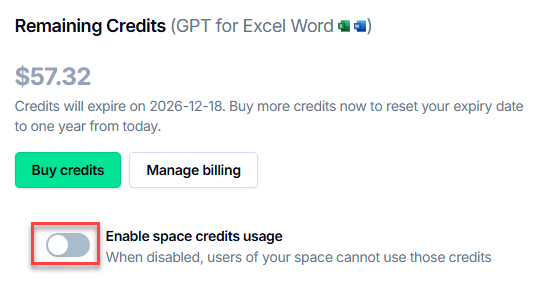
You've paused usage for the Microsoft add-in. Space users can no longer use GPT for Excel and Word.
What's next
- When you are ready to use the add-ons again, go to the GPT for Work dashboard, and click Enable space usage.