Download credit pack invoices and receipts
Download invoices and receipts for past credit pack purchases for the GPT for Work Google add-on (GPT for Sheets and Docs) or the GPT for Work Microsoft add-in (GPT for Excel Word).
Prerequisites
You have purchased a credit pack.
 Google
 Microsoft
-
Sign in to the GPT for Work dashboard with your Google account.
-
In the sidebar, click Billing.
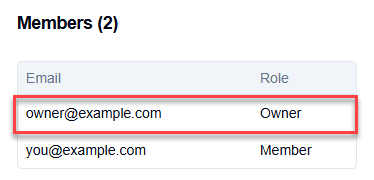
infoIf this option is not available, you can ask the owner of the space for an invoice or a receipt.
-
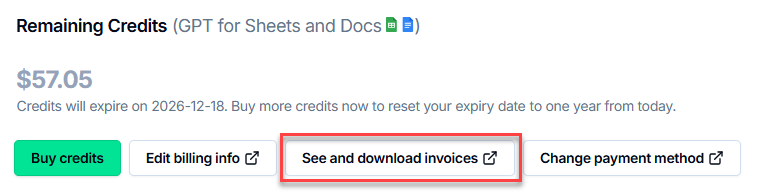
Click See and download invoices.
-
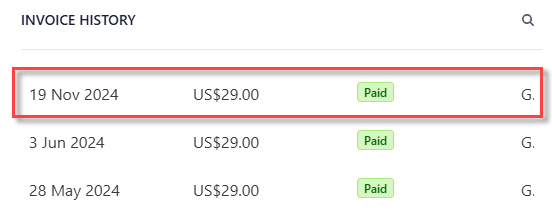
In the Invoice history section, click on the purchase whose invoice or receipt you want to download.
-
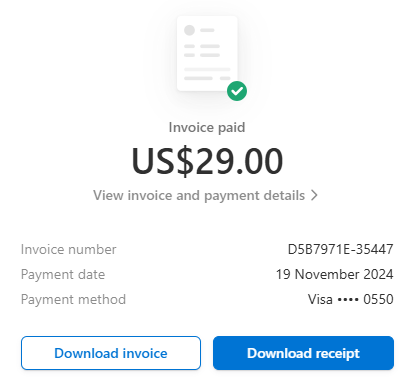
Click Download invoice or Download receipt.
What's next
-
Sign in to the GPT for Work dashboard with your Microsoft account.
-
In the sidebar, click Billing.
infoIf this option is not available, you can ask the owner of the space for an invoice or a receipt.
-
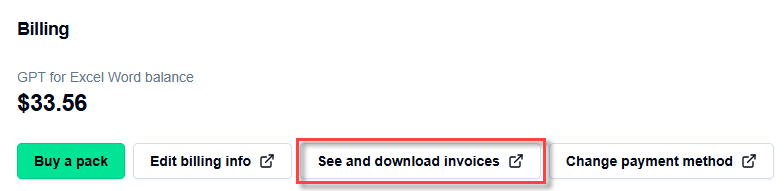
Click See and download invoices.
-
In the Invoice history section, click on the purchase whose invoice or receipt you want to download.
-
Click Download invoice or Download receipt.