Product capabilities for spreadsheets
The Agent in GPT for Sheets and GPT for Excel allows you to tackle common tasks in bulk with conversational AI. This page provides practical examples of how to make the most out of the Agent's various capabilities.
How to use the Agent examples
To try out the use cases in GPT for Sheets or GPT for Excel, use the built-in examples from the add-on sidebar.
 G Sheets
 MS Excel
-
Create a new spreadsheet.
-
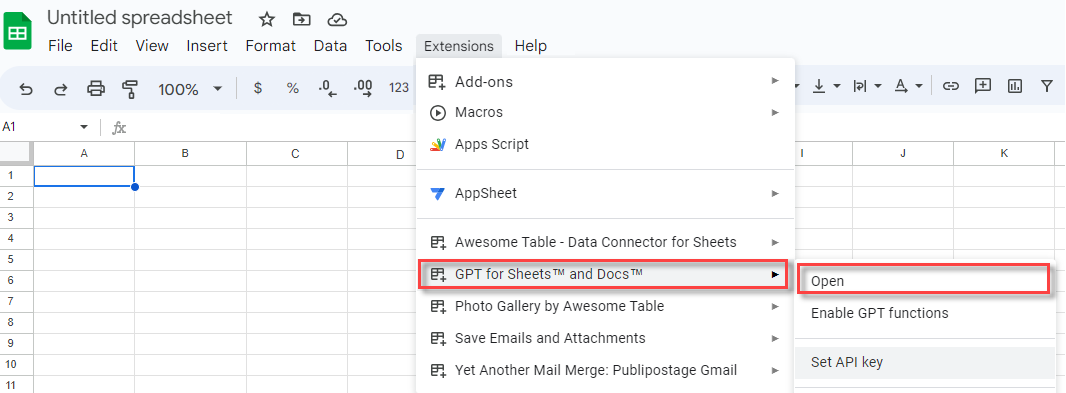
In the menu bar, select Extensions > GPT for Sheets and Docs > Open.
-
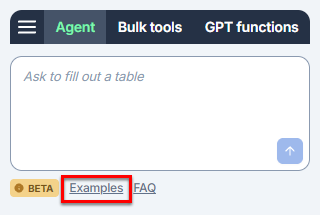
In the sidebar, click Examples and select the example you want to try out.
-
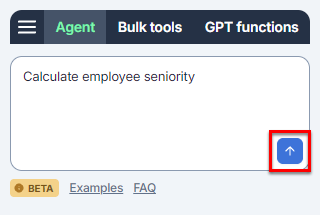
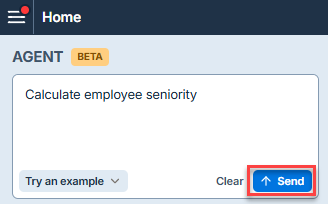
Click the send button to start the example.
The following video shows the entire process.
-
Create a new blank workbook.
-
On the ribbon, select Home > GPT for Excel Word.
 info
infoIf GPT for Excel Word is not visible on the ribbon, or if it's grayed out, select Home > Add-ins > My Add-ins > GPT for Excel Word. Learn more.
-
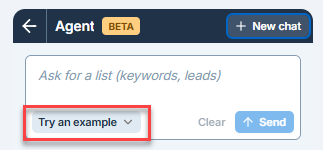
In the sidebar, click Examples and select the example you want to try out.
-
Click the send button to start the example.
The following video shows the entire process.
Content generation
SEO (h1, metas, FAQs)
Use the Agent to generate SEO-friendly content for your website. Bulk-generate meta titles and descriptions, headers, FAQs, image alt texts, and more.
In this example, the Agent is used to generate titles and descriptions for car spare parts, then generate FAQs about them.
- G Sheets
- MS Excel
Translation
Translate to multiple languages
Use the Agent to translate spreadsheet content to multiple languages in bulk. You can provide specific instructions for the translation, and even use a glossary stored in another sheet to have the translation follow your brand's terminology.
In this example, the Agent is used to translate the content of column A to the languages provided in row 1.
- G Sheets
- MS Excel
Feedback analysis
Use the Agent to categorize, filter, tag and analyze customer feedback and survey responses. This can include sentiment analysis, key topic extraction, brand and product mention identification, and more.
In this example, the Agent is used to translate support tickets to a common language, classify them based on sentiment, and define their relevance to product quality.
- G Sheets
- MS Excel
Web search
Market research
Use the Agent to generate market overviews or company profiles in bulk by fetching information from the web.
In this example, the Agent is used to research the companies in column A, and find their website, CEO name, and other information.
- G Sheets
- MS Excel
Data preparation
Data prep (inventory)
Use the Agent to prepare your data for analysis or reporting. This can include cleaning, transforming, or formatting your data to make it more useful for your purposes.
- G Sheets
- MS Excel
Data analysis
ICP fitness
Use the Agent to filter your leads and find companies and contacts that match your ideal customer profile, based your own criteria.
In this example, the Agent is used to analyze the leads based on their industry fit, role fit, location, and company size.
- G Sheets
- MS Excel
Feedback analysis
Use the Agent to categorize, filter, tag and analyze customer feedback and survey responses. This can include sentiment analysis, key topic extraction, brand and product mention identification, and more.
In this example, the Agent is used to translate support tickets to a common language, classify them based on sentiment, and define their relevance to product quality.
- G Sheets
- MS Excel
Formulas
Generate and autofill formulas
Use the Agent to generate, troubleshoot, and explain spreadsheet formulas without writing any formula code yourself. Simply describe in your own words what calculation or logic you need, and the Agent creates the appropriate formulas. This is particularly useful for complex nested formulas or functions you're unfamiliar with.
In this example, the Agent is used to generate a formula to calculate the seniority of employees in years and months.
- G Sheets
- MS Excel
Categorization
E-commerce
Use the Agent to generate product descriptions, product listings, and other content for your e-commerce website.
In this example, the Agent is used to generate a title and description for the products in column A, then categorize them and extract the main features.
- G Sheets
- MS Excel
Google Shopping (titles & categories)
Use the Agent to generate optimized content for your Google Shopping listings or for other product catalogs or paid ads.
In this example, the Agent is used to improve product titles and assign categories based on the official Google Shopping guidelines.
- G Sheets
- MS Excel
What's next?
-
Use the Agent in GPT for Sheets or GPT for Excel.
-
Learn about the Agent's business applications.