Select the models for the Agent in Excel
In GPT for Excel, the Agent uses two types of models:
-
Agent models handle chat messages, create formulas, and execute complex tasks by breaking them down into smaller tasks and delegating these to bulk models. The Agent can only use the bulk models you set in the GPT for Work dashboard.
-
Bulk models handle bulk tasks and web search tasks. The Agent uses bulk models when needed, and you use bulk models with bulk tools and GPT functions.
Select the Agent model
You can select the Agent model in the GPT for Excel sidebar. The models available depend on the models enabled for your space in the GPT for Work dashboard.
-
In the sidebar, select Agent.
-
Open the model switcher and select the Agent model.
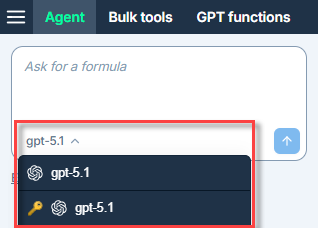
The Agent now uses the selected Agent model.
Set the bulk models
Prerequisites
You are the owner or an admin of the space.
You can set two bulk models for the Agent:
-
The Default model for bulk tasks is used by the Agent for bulk tasks. For new users in your space, this model is also selected by default in the bulk tools and GPT functions model switcher.
-
The Default model for web search bulk tasks is used by the Agent for bulk tasks that require web search. This model is also used by the GPT_WEB function.
The models available depend on the models enabled for your space.
You cannot currently select models available through OpenAI-compatible API endpoints.
-
Sign in to the GPT for Work dashboard with your Microsoft account.
-
In the sidebar, select Bulk models.
-
Select the bulk models you want the Agent to use for bulk tasks and web searches.
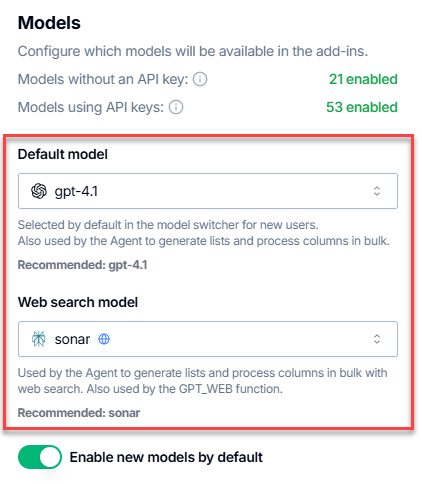
The Agent now uses the selected default bulk models for bulk tasks and web searches.
What's next
Learn more about models: