Select a model in Docs
GPT for Docs supports a range of models that you can use with your AI work in Docs. To help you find the model that offers the best balance of accuracy, speed, and cost for your use case, see our recommended models.
The available models depend on the API keys set for your current space. GPT for Docs gives you access to a default set of models available without API keys. To access additional models, set an API key for one or more AI providers.
Select a model without an API key
-
Open a Google document.
-
In the menu bar, select Extensions > GPT for Sheets and Docs > Launch.

-
Open the model settings.
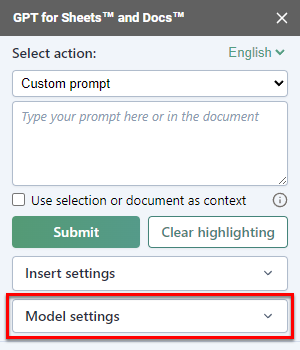
-
Under No API key needed, select a model.
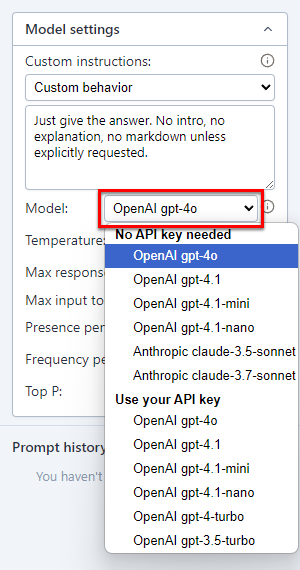
GPT for Docs now uses the selected model to generate responses.
Select a model with an API key
-
Open a Google document.
-
In the menu bar, select Extensions > GPT for Sheets and Docs > Launch.
-
Open the model settings.
-
Under Use your API key, select a model.
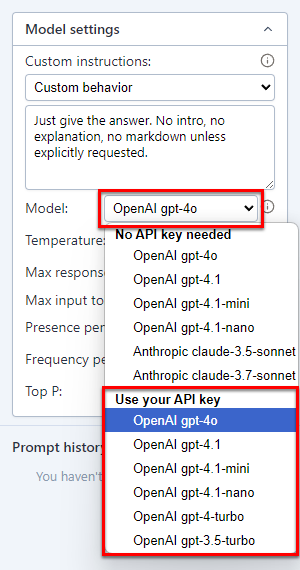
GPT for Docs now uses the selected model to generate responses.
Recommended models
As a general rule, OpenAI models are more reliable and less likely to decline prompts than models from other providers.
The following table lists our recommended models available without an API key. For more information about which add-on supports which models, see AI providers & models.
| Model | Provider | Description |
|---|---|---|
claude-4.5-sonnet | Anthropic | Great at content creation, summarization, and nuanced reasoning across a wide range of tasks. Recommended for most use cases. |
gpt-5.4 | OpenAI | Good alternative to claude-4.5-sonnet. |
gpt-4.1 | OpenAI | Good overall balance of easy prompting, speed, quality, reliability, and cost. |
gpt-4.1-mini | OpenAI | Fast, cost-effective model with strong reasoning and language capabilities. Follows instructions closely. |
gpt-4.1-nano | OpenAI | Great for extremely high-volume but easy tasks. |
What's next
Learn more about models: